
Agent System Overview
This platform runs on a Raspberry Pi 4 with Debian Linux, optimized for lightweight and continuously available AI automation. My OpenClaw environment is organized as a tree of agents and subagents, with a primary agent at the top using a free OpenRouter model to initialize the workspace and generate its .md context and memory files. Based on this shared workspace, I deploy multiple specialized subagents that retain access to the same contextual knowledge and memory state, while each is configured to use a different LLM for task-specific behavior.
The current openclaw.json configuration to achive this looks like this:
Show OpenClaw agent configuration
"list": [
  {
    "id": "general-agent",
    "workspace": "/home/<user>/.openclaw/agents/general-agent/workspace",
    "model": "openrouter/free"
  },
  {
    "id": "wordpress-agent",
    "workspace": "/home/<user>/.openclaw/agents/wordpress-agent/workspace",
    "model": "openrouter/free"
  },
  {
    "id": "status-agent",
    "workspace": "/home/<user>/.openclaw/agents/status-agent/workspace",
    "model": "openrouter/free"
  },
  {
    "id": "general-free-subagent",
    "workspace": "/home/<user>/.openclaw/agents/general-agent/workspace",
    "model": "openrouter/free"
  },
  {
    "id": "general-minimax-m2-7-subagent",
    "workspace": "/home/<user>/.openclaw/agents/general-agent/workspace",
    "model": "openrouter/minimax/minimax-m2.7"
  },
  {
    "id": "general-codex-subagent",
    "workspace": "/home/<user>/.openclaw/agents/general-agent/workspace",
    "model": "openai-codex/gpt-5.2"
  },
  {
    "id": "wordpress-free-subagent",
    "workspace": "/home/<user>/.openclaw/agents/wordpress-agent/workspace",
    "model": "openrouter/free"
  },
  {
    "id": "wordpress-minimax-m2-7-subagent",
    "workspace": "/home/<user>/.openclaw/agents/wordpress-agent/workspace",
    "model": "openrouter/minimax/minimax-m2.7"
  }
]

..........

#then assign each agent to his channel or thread

..........

{
  "agentId": "status-agent",
  "match": {
    "channel": "discord",
    "peer": {
      "kind": "channel",
      "id": "XXXXXXXXXXXXXXXXXXX"
    },
    "guildId": "XXXXXXXXXXXXXXXXXXX"
  }
},

{
  "agentId": "general-free-subagent",
  "match": {
    "channel": "discord",
    "peer": {
      "kind": "channel",
      "id": "XXXXXXXXXXXXXXXXXXX"
    },
    "guildId": "XXXXXXXXXXXXXXXXXXX"
  }
},

{
  "agentId": "general-minimax-m2-7-subagent",
  "match": {
    "channel": "discord",
    "peer": {
      "kind": "channel",
      "id": "XXXXXXXXXXXXXXXXXXX"
    },
    "guildId": "XXXXXXXXXXXXXXXXXXX"
  }
}

..........
To visualize and manage this entire network of agents and subagents, I designed a structured Discord system based on channels and threads. In this setup, each channel represents a main agent, while the threads inside each channel correspond to its associated subagents, with the exception of status threads, which do not host agents and are instead dedicated to a specific extension. As shown in the code above, I mapped every agent and subagent to its respective channel or thread, creating a clear and organized communication structure.
This approach allows me to monitor interactions more easily, separate responsibilities between agents, and keep each workflow well structured within the same environment. It also makes the system more scalable, since new agents or subagents can be integrated into the hierarchy without disrupting the existing organization.
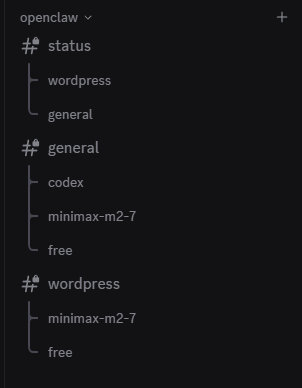
Looking ahead, I plan to develop an OpenClaw skill that will allow the system to autonomously create or eliminate agents and subagents, enabling a complete request-to-execution workflow.
As the project evolves, I intend to expand the ecosystem with additional agents, subagents, and skills, ensuring that each task can be handled with greater precision, efficiency, and adaptability.
LLM Providers and configuration
To support my OpenClaw setup, I configured two primary providers. The main default provider is openrouter/free, allowing new agents to be deployed without incurring token costs. I also added openrouter/minimax/minimax-m2.7 as my first paid model, since it offers a good balance of cost and performance for general-use workloads. While OpenRouter makes it possible to connect many additional LLMs, I do not currently need more task-specific models.
For more realistic production and workflow scenarios, I integrated OpenAI Codex through my ChatGPT account. This option remains reasonably affordable while providing access to high-capability models, a generous token budget, and seamless compatibility with OpenClaw through OAuth authentication.
To maintain security across the environment, all API keys and tokens are stored in a protected .env file and are only referenced by the services and processes that need them.
Custom Extensions
This OpenClaw system currently has two custom extensions enabled, both loaded from openclaw.json and stored under .openclaw/extensions. They are statuscard and codexstatus. Both are local, Discord-oriented operational plugins: they register commands through index.js, keep per-channel state in state.json, update cards in place instead of reposting blindly, and recreate cards automatically if Discord rejects an edit because the message is missing (10008/404) or too old to patch (30046).
Show OpenClaw agent configuration
"list": [
  {
    "id": "general-agent",
    "workspace": "/home/<user>/.openclaw/agents/general-agent/workspace",
    "model": "openrouter/free"
  },
  {
    "id": "wordpress-agent",
    "workspace": "/home/<user>/.openclaw/agents/wordpress-agent/workspace",
    "model": "openrouter/free"
  },
  {
    "id": "status-agent",
    "workspace": "/home/<user>/.openclaw/agents/status-agent/workspace",
    "model": "openrouter/free"
  },
  {
    "id": "general-free-subagent",
    "workspace": "/home/<user>/.openclaw/agents/general-agent/workspace",
    "model": "openrouter/free"
  },
  {
    "id": "general-minimax-m2-7-subagent",
    "workspace": "/home/<user>/.openclaw/agents/general-agent/workspace",
    "model": "openrouter/minimax/minimax-m2.7"
  },
  {
    "id": "general-codex-subagent",
    "workspace": "/home/<user>/.openclaw/agents/general-agent/workspace",
    "model": "openai-codex/gpt-5.2"
  },
  {
    "id": "wordpress-free-subagent",
    "workspace": "/home/<user>/.openclaw/agents/wordpress-agent/workspace",
    "model": "openrouter/free"
  },
  {
    "id": "wordpress-minimax-m2-7-subagent",
    "workspace": "/home/<user>/.openclaw/agents/wordpress-agent/workspace",
    "model": "openrouter/minimax/minimax-m2.7"
  }
]

..........

#then assign each agent to his channel or thread

..........

{
  "agentId": "status-agent",
  "match": {
    "channel": "discord",
    "peer": {
      "kind": "channel",
      "id": "XXXXXXXXXXXXXXXXXXX"
    },
    "guildId": "XXXXXXXXXXXXXXXXXXX"
  }
},

{
  "agentId": "general-free-subagent",
  "match": {
    "channel": "discord",
    "peer": {
      "kind": "channel",
      "id": "XXXXXXXXXXXXXXXXXXX"
    },
    "guildId": "XXXXXXXXXXXXXXXXXXX"
  }
},

{
  "agentId": "general-minimax-m2-7-subagent",
  "match": {
    "channel": "discord",
    "peer": {
      "kind": "channel",
      "id": "XXXXXXXXXXXXXXXXXXX"
    },
    "guildId": "XXXXXXXXXXXXXXXXXXX"
  }
}

..........
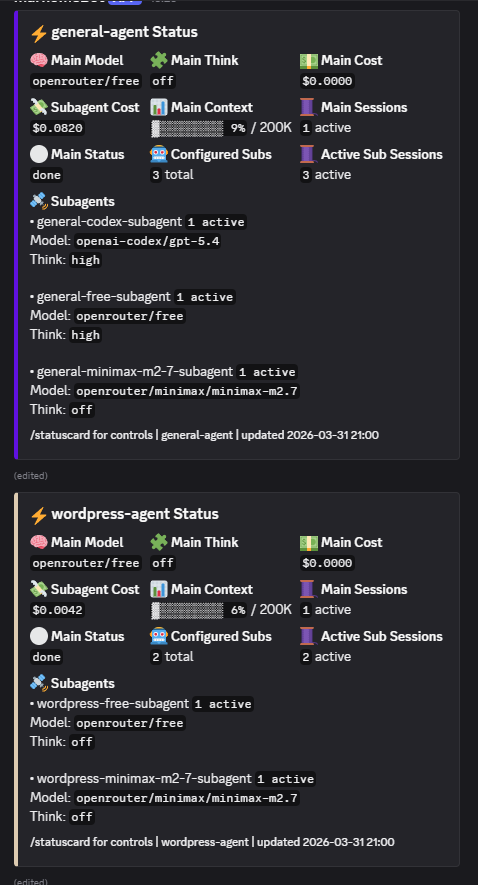
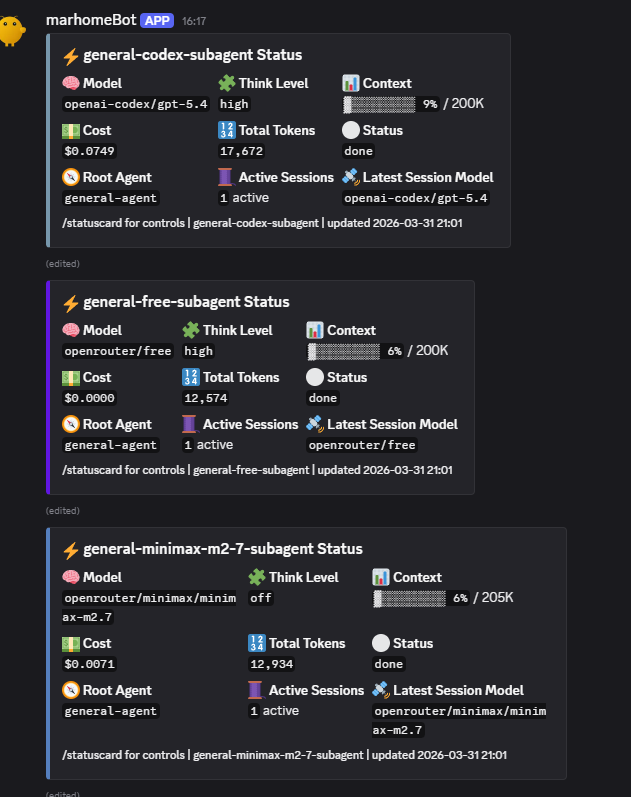
STATUSCARD is the system’s agent observability extension. Its job is not just to show whether an agent exists, but to turn the current OpenClaw topology into live Discord cards that reflect how the agent layer is actually behaving. It reads the configured agents from openclaw.json, groups them by shared workspace, chooses one root card per workspace, and then discovers subagents dynamically instead of relying on a hardcoded list. That means the extension naturally adapts when new subagents are added or removed from the configuration. It also inspects session ownership using Discord channel and thread bindings, session-key prefixes, and shared workspace session files, which lets it map activity back to the correct root agent or subagent even when session shapes differ. In practice, this makes statuscard a compact live map of the agent system: model, think level, context usage, main cost, aggregated subagent cost, active session count, and per-subagent activity all appear together in one operational view. It exposes /statuscard help, /statuscard agents, /statuscard init, /statuscard subagents <agentId>, and removal commands, so it functions as both a dashboard and a control surface for card lifecycle management. A useful technical detail is that it prefers configured model IDs and configured thinking levels when available, but it can fall back to runtime .jsonl events such as thinking_level_change, which makes the cards more accurate than a purely static config snapshot. Its main references are card-context.md, index.js, and statuscard-core.js.
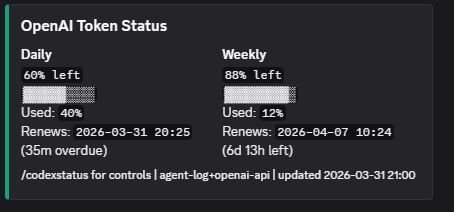
CODEXSTATUS is narrower in scope but equally important: it is the quota and renewal monitor for OpenAI/Codex usage. Where statuscard observes agents, codexstatus observes consumption windows. The current implementation is fetch-only, meaning it does not invent limits or compute arbitrary budgets; instead, it tries to reflect real usage data from sources it can verify. Its preferred source is the same live usage snapshot used by openclaw status –json –usage, and it can also query the OpenAI usage endpoint at /v1/organization/usage/completions. If those sources do not yield usable daily or weekly % left values, it falls back to parsing recent Discord messages in the same channel and then recent agent session logs, looking for quota phrases such as “Daily usage: 79% left” or natural-language equivalents. That fallback design is one of the most distinctive characteristics of the extension: it is resilient, source-layered, and explicitly protects itself from re-ingesting its own card output. On the Discord side, it renders a compact OpenAI Token Status card with separate daily and weekly sections, progress bars, used percentages, and renewal timing, with daily renewal expressed in hours and weekly renewal in days. It also keeps channel-specific memory in state.json, supports /codexstatus, /codexstatus refresh, /codexstatus show, /codexstatus help, and /codexstatus remove, and is designed to be refreshed by its companion updater script. A key limitation, documented in the extension itself, is that public usage endpoints do not always expose Plus-style % remaining directly, so the card may legitimately show N/A until discoverable values appear in a trusted source. Its main references are codexstatus-context.md, index.js, and codexstatus-core.js.
Together, these two extensions form the custom monitoring layer of the system. statuscard answers “what are the agents doing right now, and how is the workspace tree behaving?”, while codexstatus answers “what is the current OpenAI/Codex usage situation, and when do the limits renew?” The first is topology-and-session observability; the second is quota-and-renewal observability. That division is clean, practical, and very consistent with the broader role of the status-agent in this installation.
Skills Developed
AI Agent Orchestration
Designed, deployed, and managed multiple AI agents for automation, each with isolated configuration and dynamic discovery.
Real-Time System Monitoring
Implemented live tracking of CPU, memory, disk, and network resources, with automated reporting and alerting.
Discord Integration
Built robust Discord bot extensions for real-time status updates, command handling, and seamless user interaction.
Secure Automation
Developed secure credential management and access controls for safe, remote operation and agent management.
Extensible Architecture
Engineered a modular system allowing rapid addition or removal of agents and features without downtime.
Custom Plugin Development
Created and maintained plugins (like StatusCard) for enhanced monitoring, reporting, and integration with external services.
Remote Management
Enabled remote SSH access, automated updates, and scheduled tasks for hands-off system maintenance.
User-Friendly Automation
Focused on ease of use, allowing non-technical users to manage agents and monitor system health via Discord or web interfaces.
Deployed Services
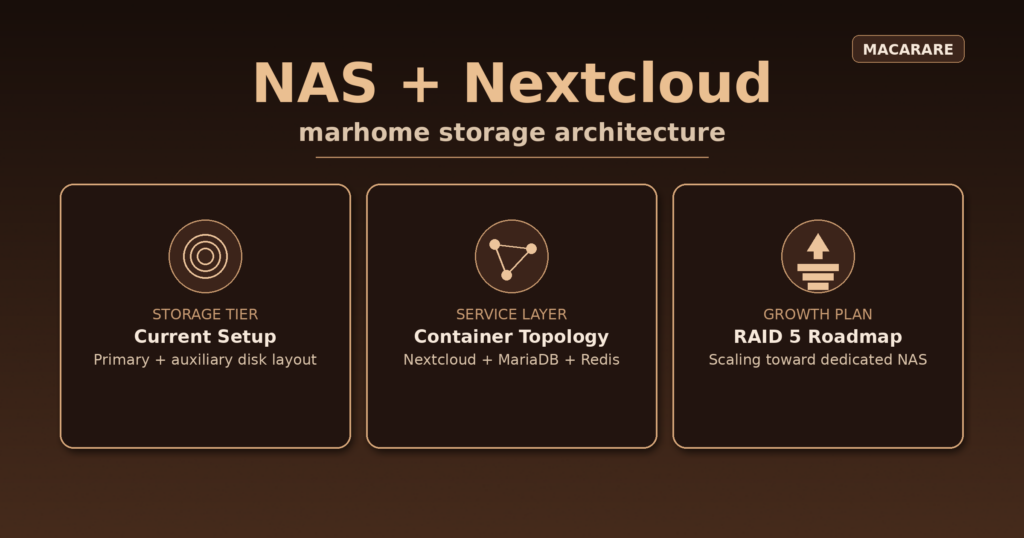
NAS (NextCloud)
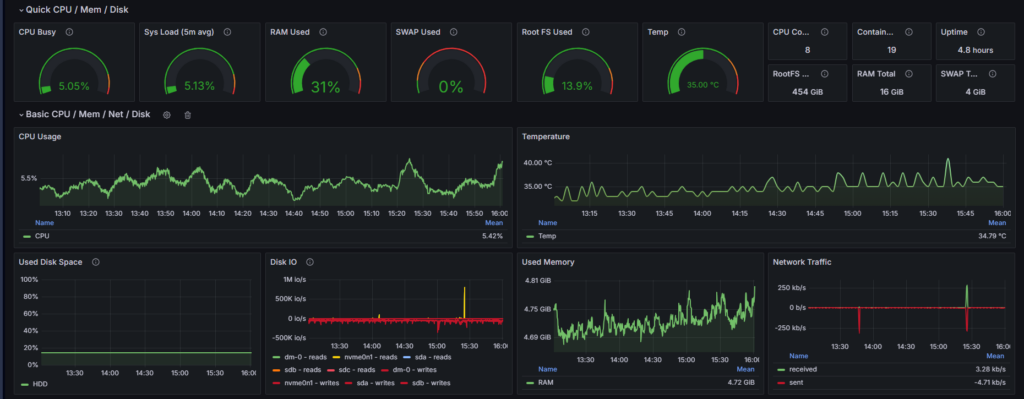
Monitoring

WordPress

NGINX